First-Time Use
- Pull out the battery insulator to activate the pedometer
- If the screen does not function normally, perform a System Reset
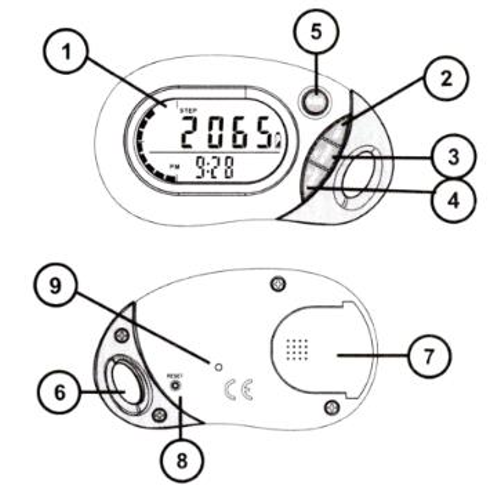 |
1. LCD Display 2. SET button 3. MODE button 4. RESET button 5. MEMORY button 6. Lanyard hole 7. Battery cover 8. System RESET hole 9. Buzzer hole
|
Setting Up the Pedometer
- In STEP mode press and hold SET until the display shows the SETUP icon and the digits start blinking
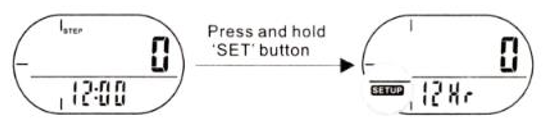
- Press the RESET button to select 12Hr or 24Hr clock display (e.g. 1:00PM or 13:00)
- Press the SET button to enter the settings below
- Clock time
- CM (metric) or IN (imperial)
- Stride length (see below for further instructions)
- Weight
- Step target
- Use the RESET ⯅ / MODE ⯆ buttons to set desired value
- Press the SET button to confirm selection
To remove the pedometer from the included plastic clip, simply hold onto the clip with the pedometer screen facing up, and firmly pull the pedometer towards yourself -- don't be afraid to give it a strong tug!
Setting Your Stride Length
Note: the default stride is 30 in / 80 cm
To calculate your own stride:
- Take 10 steps with your normal stride
- Measure the distance from start to end
- Calculate your stride by dividing the total distance by 10
Example: Total distance = 150 in / 10 paces = 15 in stride length